Technology

From Acquisition to Playout — Technology That Shapes Your Workflow

From ingest and encoding to media processing, NLE integration, archive, transfer, workflow, and AI — we cover the entire broadcast workflow with technology we built ourselves.

01INGEST & ENCODING

Ingest & Video Encoding

The first stage where media enters the system. From ingest management that controls commercial video servers to IO-board-based real-time encoding, we ingest diverse input sources into broadcast and archive formats.
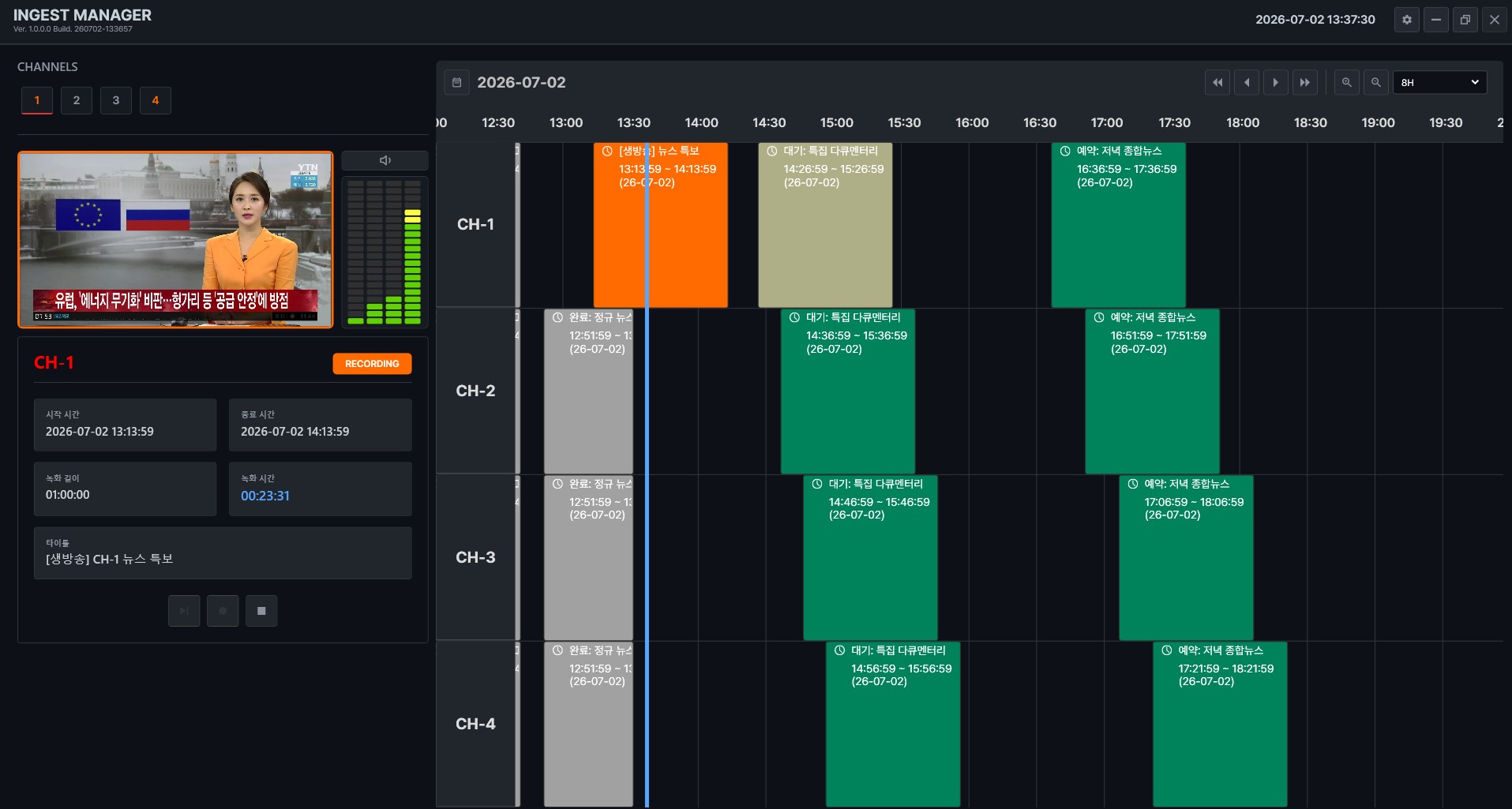
Ariel Ingest Manager Video Server-Based Ingest diagram

Video Server-Based Ingest

Video Server Ingest

Controls commercial video servers such as Harmonic, Grass Valley, and Imagine to acquire media. For customers who need only ingest management, it also integrates with third-party MAM and storage systems.

  • 01Commercial video server control
    Controls major video servers such as Harmonic, Grass Valley, and Imagine via VDCP and transfers media over FTP.
  • 02Flexible integration
    Delivers ingest results to Geminisoft MAM via RESTful + MXF, and to third-party MAM via XML + MXF.
  • 03Standalone ingest
    The ingest management function can be deployed on its own, running on top of your existing MAM and storage.
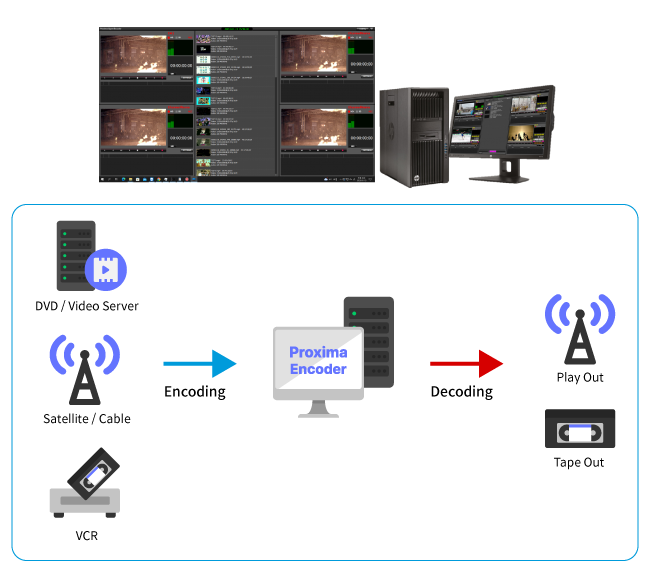
Proxima Open Encoder IO Board-Based Real-Time Encoding diagram

IO Board-Based Real-Time Encoding

Open Encoder

Receives video input through an IO board and generates video in a variety of formats using software codecs. A single unit handles basic broadcast operations.

  • 01Software codec encoding
    Converts DVD, video server, satellite/cable, and VCR inputs received through the IO board into a variety of formats.
  • 02Two playback modes
    Provides back-to-back playback for short in-house broadcasts and TAKE mode for live inserts.
  • 03All-in-one operation
    Handles everything from encoding to playout and tape out in a single system.
02MEDIA PROCESSING

Media Processing

Media conversion technologies for efficient video processing. From rewrapping that changes formats without re-encoding to GPU-accelerated transcoding, smart-rendering editing, scene analysis, and loudness measurement, we cover the full range of broadcast post-processing.

Ariel Transcoder GPU-Accelerated Transcoder diagram

GPU-Accelerated Transcoder

GPU Transcoder

Converts video across a wide range of codecs into broadcast and distribution formats with GPU acceleration. Accepts multiple input codecs and rapidly encodes to IMX SD, XDCAM HD, and H.264.

  • 01Broad input codec support
    Accepts MPEG-2, MPEG-4, DV, and ProRes/DNxHD families as input.
  • 02Broadcast and distribution output
    Converts to IMX SD, XDCAM HD, and H.264 families.
  • 03GPU acceleration
    Processes XDCAM to H.264 (IPTV quality) at approximately 6.9x real time on Intel Pro Graphics GPUs.
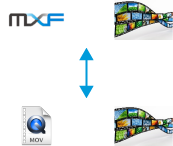
Rewrapper Lossless Rewrapping diagram

Lossless Rewrapping

Rewrapper

Changes only the wrapper (container) without re-encoding the video, converting formats in a short time with no quality loss.

  • 01Lossless rewrapping
    Converts containers between MXF ↔ MOV and TS ↔ MP4 without re-encoding.
  • 02Broadcast and editing format compatibility
    Converts between broadcast MXF and Apple MOV.
  • 03Recorded TS to MP4
    Generates MP4 files from recorded TS video.
Cutting & Merge Video Cutting & Merge diagram

Video Cutting & Merge

Cutting & Merge

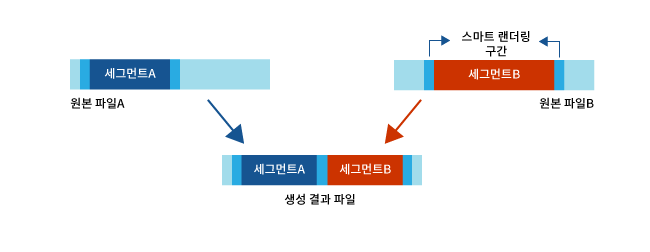
Creates new video by cutting and joining segments based on cut information. Smart rendering avoids re-encoding the entire file, keeping processing fast.

  • 01Smart rendering
    Re-encodes only the cut sections (GOP boundaries) and joins the rest as-is, reducing processing time.
  • 02Cut & merge
    Cuts multiple segments and produces a single output file.
  • 03Wide codec support
    Supports H.264/AAC/MP4, H.265 (HEVC), IMX 30/40/50Mbps, DV25/DVCPRO, and AVC-Intra.
Ariel Catalog Scene Analysis & Cataloging diagram

Scene Analysis & Cataloging

Cataloging

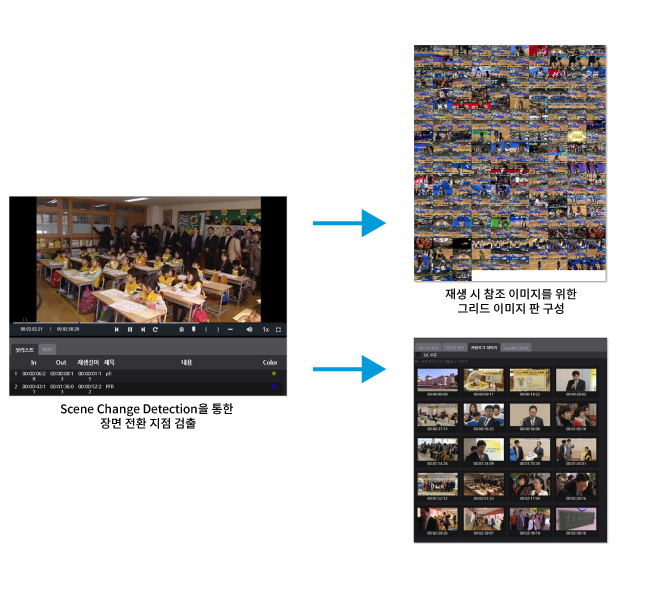
Analyzes video scenes to detect scene-change points and generates key frames displayed in the MAM interface, so content can be browsed at a glance.

  • 01Scene change detection
    Automatically finds transition points using scene change detection.
  • 02Key frame generation
    Extracts representative frames per segment to build a storyboard.
  • 03MAM integration
    Builds a grid image board referenced during playback for instant review in the MAM.
Loudness Detection Loudness Detection diagram

Loudness Detection

Loudness Detection

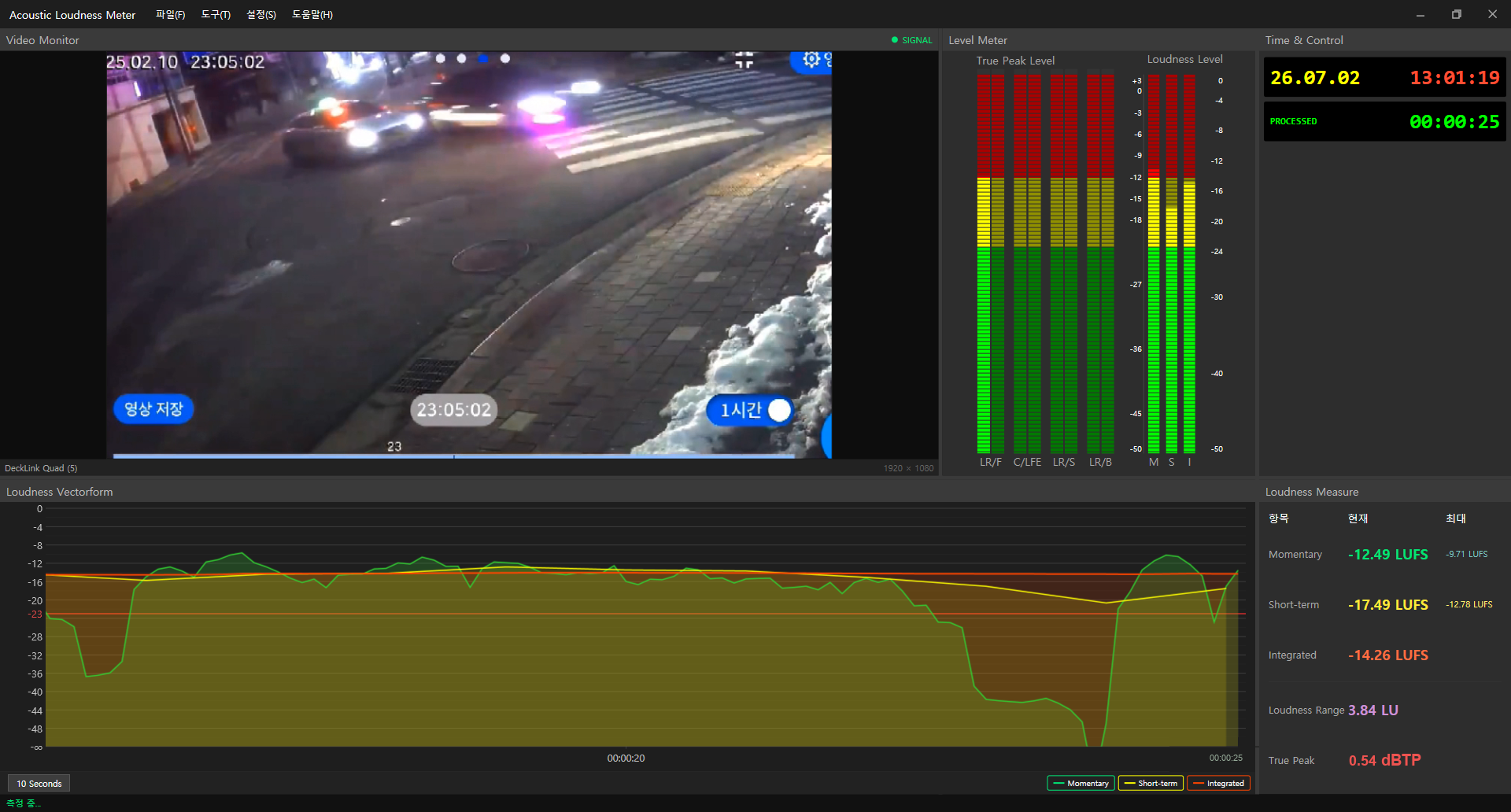
Measures perceived loudness in line with international standards, calculating loudness in accordance with ITU-R BS.1770.

  • 01International standard measurement
    Measures perceived loudness to the ITU-R BS.1770 specification.
  • 02Standard units
    Provides results in dB LKFS and dB LUFS.
  • 03Real-time and file-based measurement
    Supports real-time metering and file-based measurement (Integrated, Short-Term, Momentary, True Peak).
03NLE INTEGRATION

NLE Integration

We provide plugin technology that integrates with the world's major NLE editing systems. Edited video can be uploaded directly to the MAM without a separate program. Unlike competitors that support only one or two systems, we broadly support major NLE platforms.

NLE Plug-in NLE Plugin Integration diagram

NLE Plugin Integration

NLE Plug-in

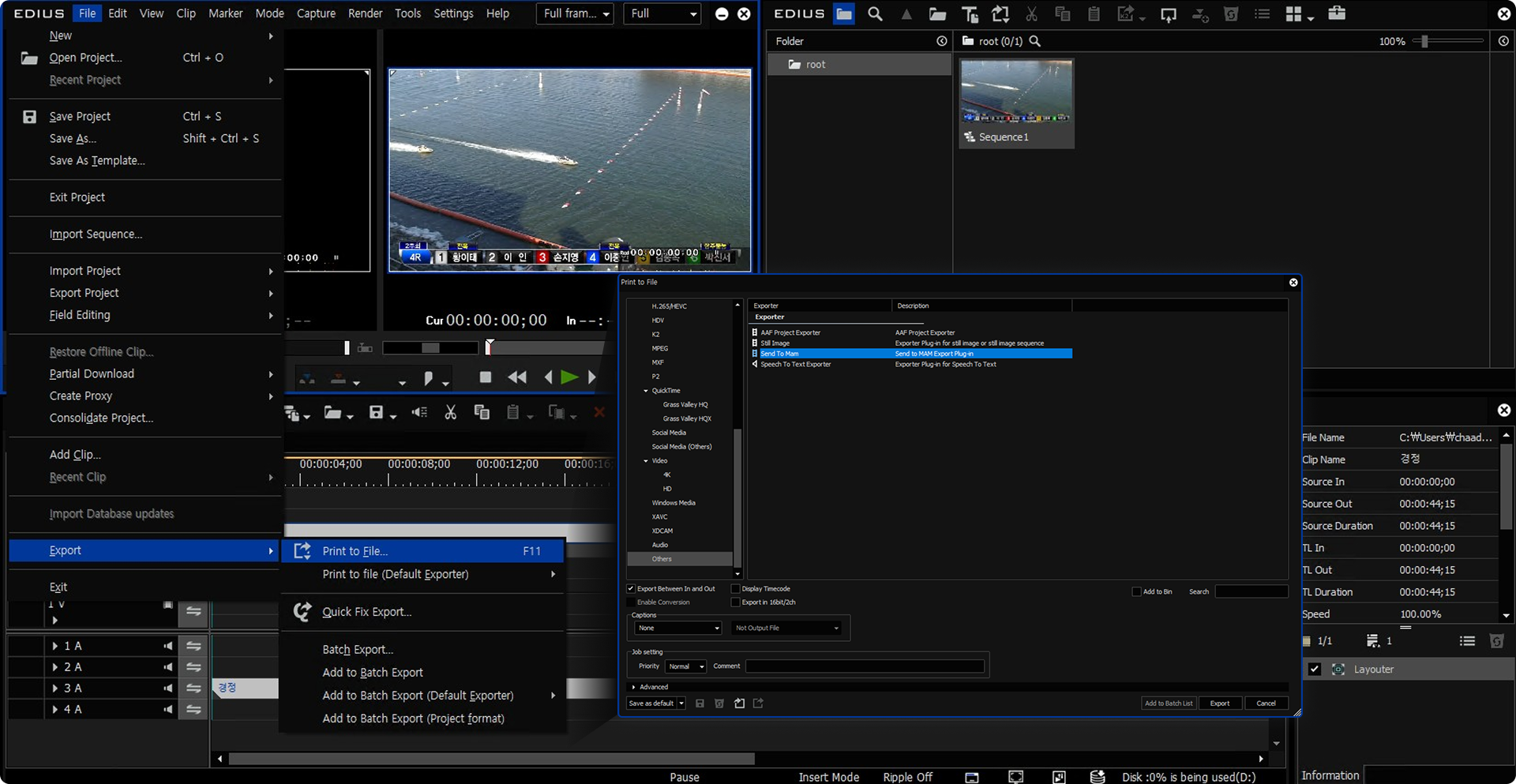
A MAM transfer menu is embedded in the menus of major NLE editing systems, sending video from the editing system straight to the MAM — no separate program required.

  • 01In-menu transfer
    A MAM transfer item is built into the editing system's menu, uploading edited content directly to the MAM.
  • 02Broad support
    Supports Adobe Premiere, Apple Final Cut Pro X, GrassValley EDIUS, and Avid Media Composer.
  • 03Differentiated compatibility
    Unlike competitors that support only one or two systems, we integrate broadly with major NLE platforms.
Web NLE Web-Based Video Editing diagram

Web-Based Video Editing

Web Video Editor

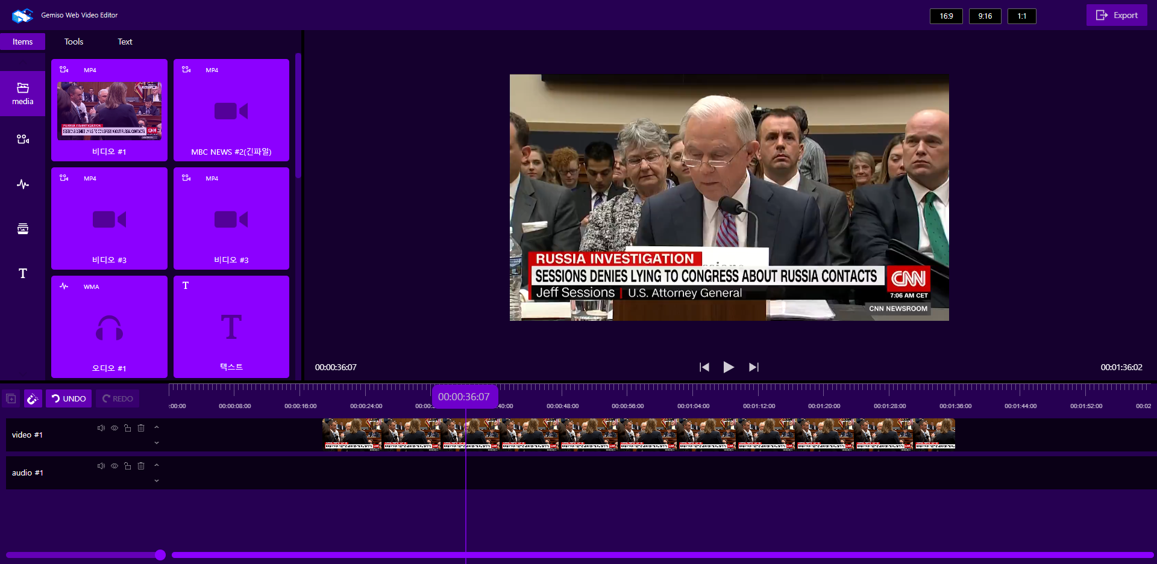
Create and edit video in a web browser without desktop software such as Adobe Premiere. Export edited content directly to platforms like YouTube.

  • 01No installation required
    Create and edit video content with nothing but a browser.
  • 02Timeline editing
    Place media, text, and audio on the timeline to build cuts and subtitles.
  • 03Instant distribution
    Export edited content directly to platforms such as YouTube.
04ARCHIVE SYSTEM

Archive System Technology

Keeping media data only on shared storage such as SAN or NAS makes instant access convenient, but drives up costs and increases the risk of data loss. Geminisoft overcomes this limitation through archive solution integration, storing media safely and economically.

3rd Party Archive Third-Party Archive Integration diagram

Third-Party Archive Integration

3rd Party Integration

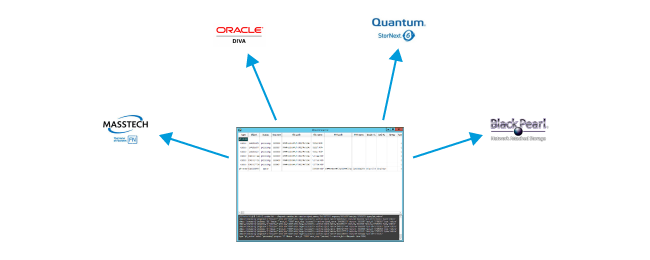
Integrates with a wide range of external archive solutions, layering directly on top of the archive environment already in operation.

  • 01Multi-solution support
    Integrates with Oracle DIVArchive, Masstech-SGL FlashNet, Quantum StorNext (Artico), and SpectraLogic BlackPearl.
  • 02Leverage existing environments
    Connects your deployed archive solution to the MAM workflow without replacing it.
  • 03Workflow automation
    Automates archiving and restoration through workflows.
IMArchive In-House Archive Platform IMArchive diagram

In-House Archive Platform IMArchive

In-house Archive Platform

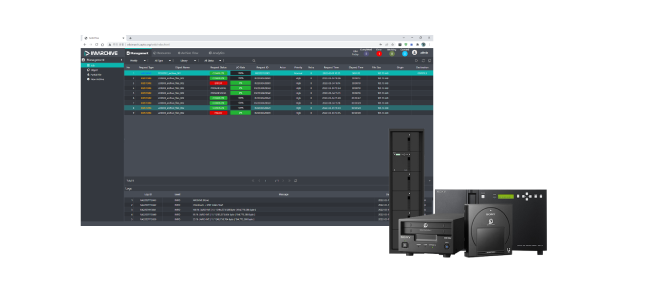
An archive platform developed in-house by Geminisoft. Stores media on a range of media types, from LTFS-based tape to ODA.

  • 01LTFS-based archiving
    Archives media to LTFS libraries from Quantum, Oracle, and others.
  • 02ODA archiving
    Uses SONY ODA hardware to store media on optical disc.
  • 03Storage integration
    Integrates with various storage systems to manage archiving and restoration.
05MEDIA TRANSFER

Media Transfer

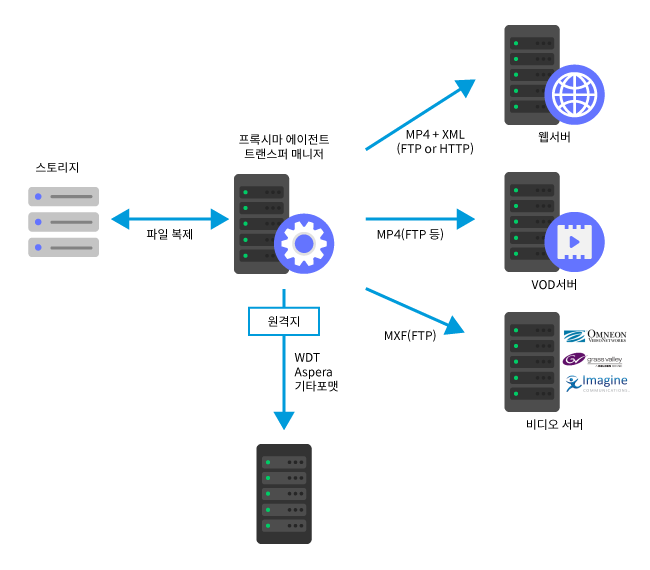
Broadcast video servers and media delivery often require transfer methods that differ from ordinary file copying. Our Transfer Manager, built on broadcast video delivery know-how, handles format conversion and transfer tailored to each destination.

Ariel Transfer Transfer Manager diagram

Transfer Manager

Transfer Manager

Transfers media between storage and web, VOD, and video servers, converting to the format each destination requires. Also supports accelerated transfer and file verification.

  • 01Destination-specific format delivery
    Exports MP4 + XML (FTP/HTTP) to web servers, MP4 (FTP) to VOD servers, and MXF (FTP) to video servers.
  • 02Broadcast format conversion
    Seamlessly converts between MOV ↔ MXF and LXF ↔ MXF.
  • 03Accelerated & remote transfer
    Rapidly delivers large media files to remote sites via WDT, Aspera, and more.
  • 04File verification
    Generates MD5 hashes to verify the integrity of large source files.
  • 05Video server integration
    Transfers to commercial video servers such as Omneon, Grass Valley, and Imagine.
06WORKFLOW

Workflow Management

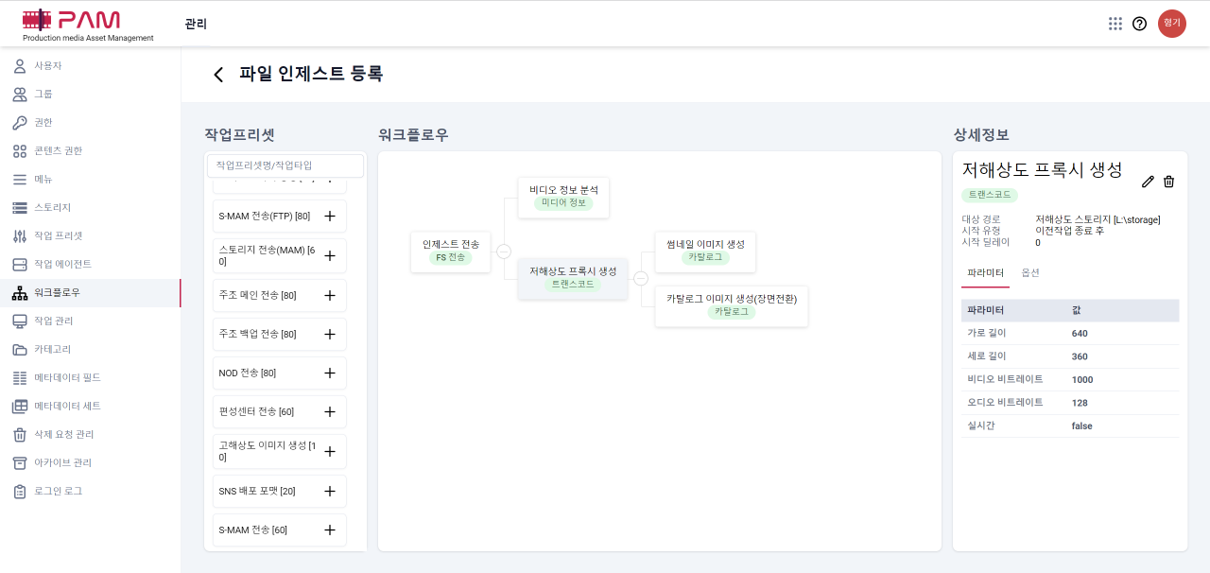
Learning business process tools and drawing diagrams is no easy task. With the workflow editor built into the MAM, anyone can easily define and modify complex media processing pipelines.

Workflow Editor Workflow Editing diagram

Workflow Editing

Workflow Editor

A workflow editing tool built into the MAM solution. Groups processing steps such as ingest, conversion, and cataloging into tasks and composes the flow visually.

  • 01Visual flow composition
    Links processing steps into a diagram, such as ingest transfer → video analysis → proxy generation → thumbnail & catalog generation.
  • 02Task presets
    Registers frequently used tasks — S-MAM transfer, storage transfer, MCR transfer, SNS distribution formats — as presets you can drag and drop.
  • 03Fine-grained parameter control
    Specifies per-step parameters such as target paths, start conditions (after the previous task completes), resolution, and bitrate.
  • 04Easy to define and modify
    Define workflows and change them on the spot without learning a separate process tool.
07AI DYNAMIC

AI Dynamic Compensation

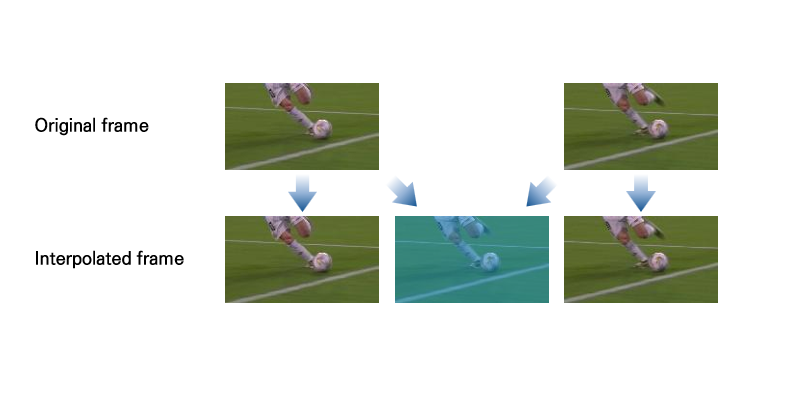
Generates new intermediate frames between consecutive frames of existing video, raising the frame rate and making motion smoother. A deep learning-based frame prediction model produces naturally flowing video.

Frame Interpolation AI Frame Interpolation diagram

AI Frame Interpolation

Frame Interpolation

A deep learning-based frame prediction model analyzes the optical flow between two consecutive frames to generate naturally connected intermediate frames.

  • 01Deep learning frame prediction
    Analyzes optical flow between consecutive frames to create intermediate frames.
  • 02Smooth motion
    Raises the frame rate to effectively reduce motion blur and stuttering in low-frame-rate video.
  • 03Natural interpolation
    Generates new motion-aware frames rather than simple duplicates.
Processing Pipeline Split, Interpolate & Merge Processing diagram

Split, Interpolate & Merge Processing

Processing Pipeline

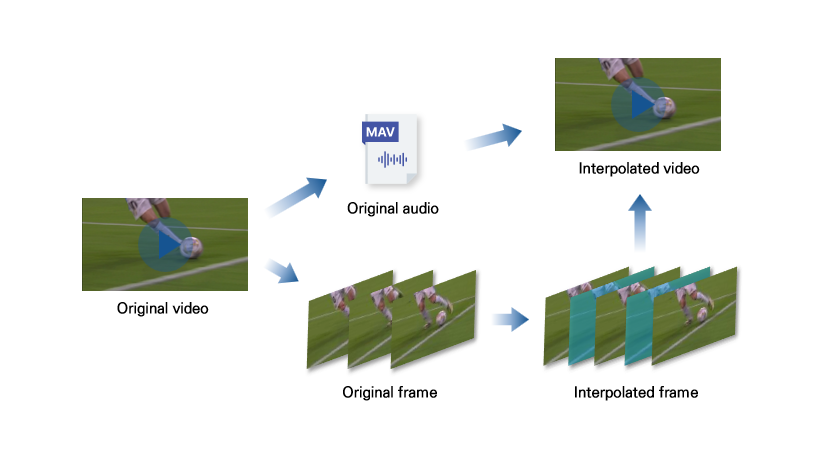
Separates audio and frames from the source video, interpolates only the frames, then remerges them with the original audio for output — exported in formats suited to broadcast environments.

  • 01Split, interpolate & merge
    Extracts audio and frames from the source, interpolates the frames, then merges them back with the original audio for output.
  • 02Multiple scan types
    Supports both progressive and interlaced video.
  • 03Broadcast-standard output
    Outputs at the broadcast-standard 29.97fps, ready for immediate use in broadcast environments.

Let's Design the Technology You Need

Tell us about your broadcast workflow and our team will help you find the right technology and solutions.